02 — Getting started
OpenCode 2 plugin
From chat to file: installation, real screenshots, local Git, diff tabs, Markdown, images and the integrated editor's complete shortcuts.
On this page
What it installs and what is published
Package @2jmalvarez/[email protected] is published and verified on npm, independently of standalone OEC. It neither replaces the conversation nor modifies OpenCode: it adds an editor and panels inside its TUI.
npm install -g openeditorcode installs only the standalone editor. Configure the plugin separately in cli.json. Cloning and building are not required to request the npm package.
Your project beside the conversation
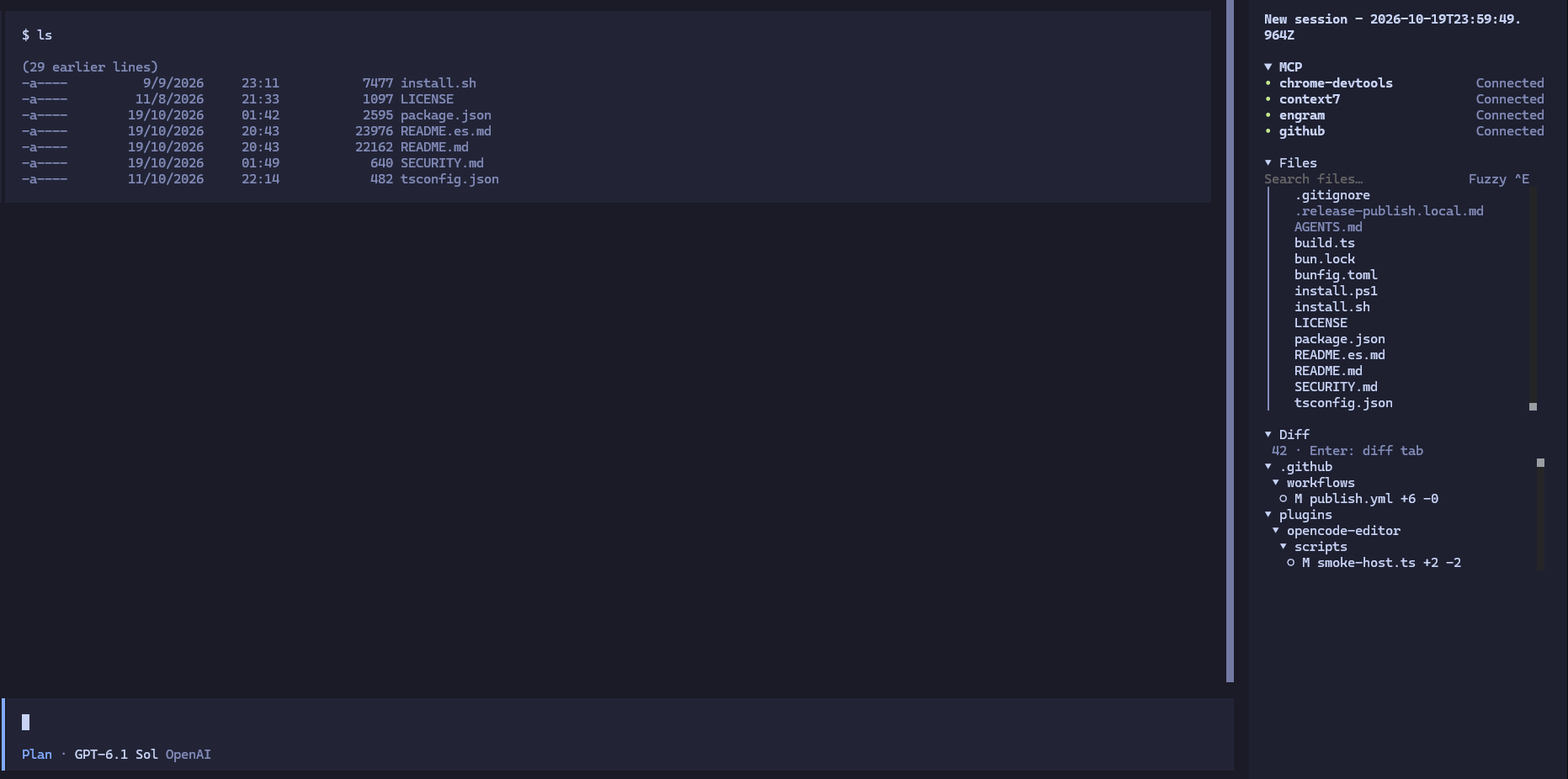
View a readable detail of Files and Diff
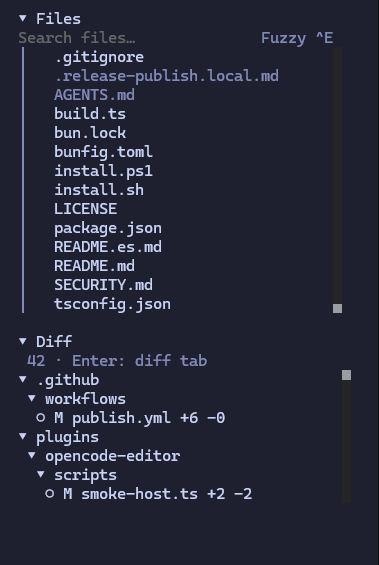
Crop of the conversation screenshot, without changing panel contents.
- Files shows folders and files; Ctrl+F or the Fuzzy ^F / Literal ^F / Name ^F selector toggles name/path and content. Ctrl+E retains Fuzzy/Literal for names.
- Diff shows local repository changes, not just files touched by the agent. Keep both panels open while continuing to type in chat.
- F7 hides the entire Files section, including its header. Collapsing via the header is a separate action that retains search/tree state for later. F8 toggles Diff without changing Files.
- Files and Diff show headers from startup without reading disk before consent. panelHeight: expanded uses the actual remaining viewport after context/MCP; lists share equal height. compact retains bounded heights. Each tree has independent scrolling.
An editor without leaving your session
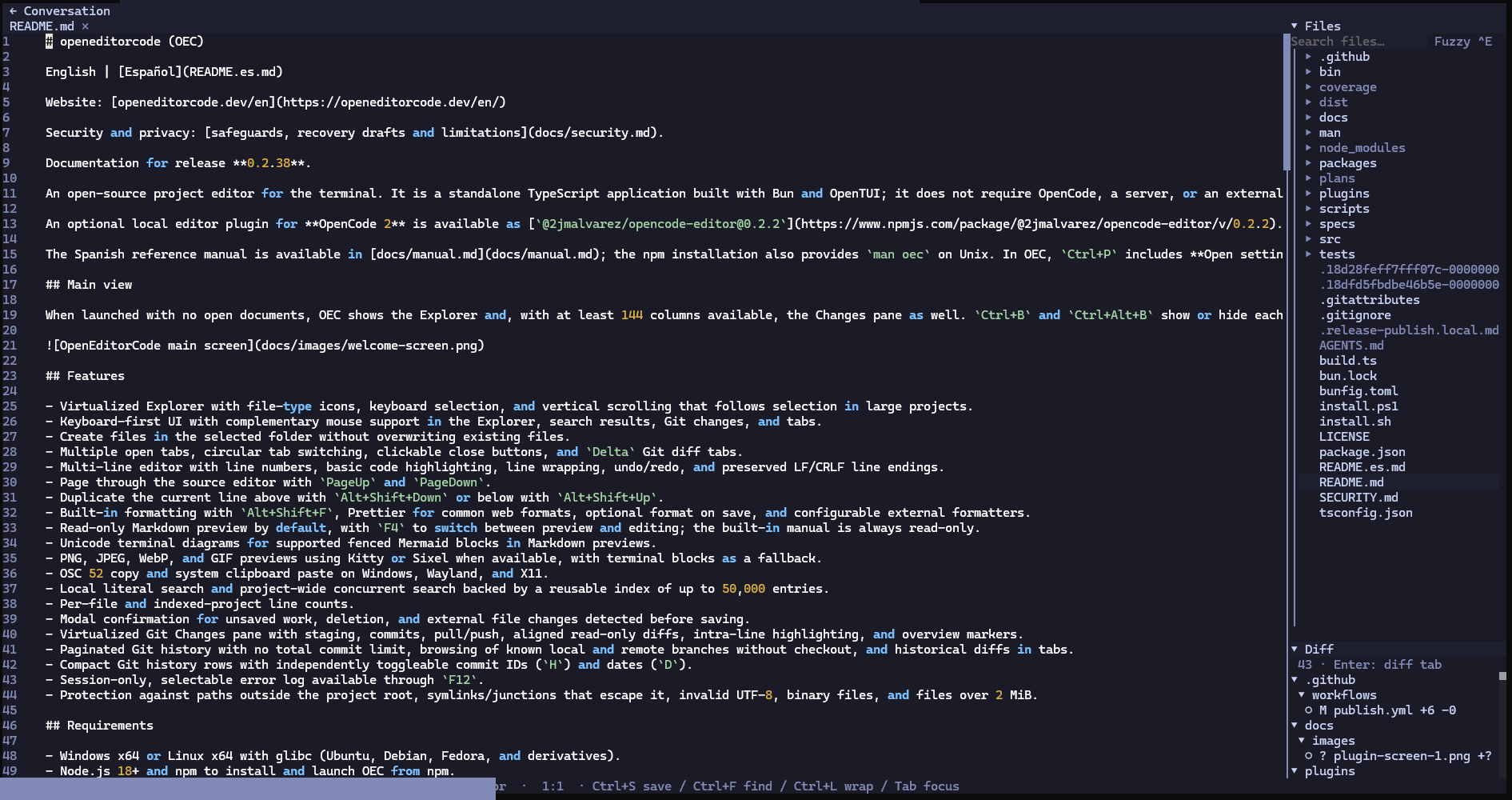
F6 toggles conversation/editor while retaining panels, documents, cursor, scroll and pending edits. It neither sends a prompt nor saves automatically. Document tabs are independent of OpenCode sessions.
The screenshot shows README source: line numbers, highlighting and editing controls. Markdown also has a preview, and images open in read-only tabs, explained below.
Before installing
- OpenCode 2: minimum API 2.0.26, declared range >=2.0.26 <3. Verified publication matrix: 2.0.26 / 2.0.27 / 2.1.0 / 2.1.1 on Windows and Linux. Not compatible with V1, nor a certification of every terminal or later version.
- Bun runtime 1.3.14+. OpenCode supplies OpenTUI >=0.5.17 <0.7.0 and Solid >=1.9 <2; do not install private copies. Use plugin 0.3.1 or later for OpenCode 2.1.x: earlier versions do not meet its native resource ownership requirements. Git must be available for Diff; file editing does not require a repository.
- An accessible local directory and explicit consent before reading it, unless a grant is remembered for that exact root and computer/user, or localRoot is explicitly configured. The plugin follows the session directory; it does not use its installation folder as the project. Roots keep separate controllers, documents and drafts.
1. Locate global configuration
- Open cli.json in the reported folder, usually ~/.config/opencode/cli.json. XDG_CONFIG_HOME can change it. Back it up before editing.
- Add the plugin entry to the existing plugins array. Preserve other entries and settings. Do not replace the entire file if it already contains configuration.
- Do not add it to opencode.json or .oec/config.json: these are OpenCode TUI options. There is no project-local cli.json.
opencode --version
opencode debug paths config
2. Configure the package on Windows
OpenCode downloads the package when loading it. Neither a global OEC installation nor localRoot is required. Save and reload the plugin or restart the TUI. For installation errors, check /plugins, the host version and the verification scope at the start of this guide.
{
  "$schema": "https://opencode.ai/v2/cli.json",
  "plugins": [
    {
      "package": "@2jmalvarez/[email protected]",
      "options": {
        "toggleBinding": "f6",
        "filesBinding": "f7",
        "diffBinding": "f8",
        "explorerWidth": 30
      }
    }
  ]
}
The same installation on Linux
{
  "$schema": "https://opencode.ai/v2/cli.json",
  "plugins": [
    {
      "package": "@2jmalvarez/[email protected]",
      "options": {
        "toggleBinding": "f6",
        "filesBinding": "f7",
        "diffBinding": "f8",
        "explorerWidth": 30
      }
    }
  ]
}3. Open your first file
- Open a session in your project and find OEC: opencode-editor in Ctrl+P. Confirm directory access ON THIS COMPUTER when requested. Cancelling does not read files.
- F7 shows Files; ↑/↓ navigates and Enter opens files or expands folders. Diff appears by default after consent and is separately controlled with F8.
- In editable source, Tab focuses text, Enter creates a line and Ctrl+S saves. Ctrl+W closes with confirmation for pending edits.
- F6 returns to the conversation. Press F6 again to continue: tabs, edits and panel visibility remain intact.
Local permissions: allow, remember or forget
- Allow for this TUI only grants access until OpenCode exits. Allow and remember this folder remembers the exact root for this computer/user. Deny access or Esc does not read the project. Other roots or subdirectories opened as independent projects are not authorized.
- Forget remembered folder access in the palette removes the saved grant without closing documents or losing drafts; consent is requested again after restart. localRoot continues explicitly authorizing its path until removed from cli.json. Remote workspaces require an explicit override even with a remembered grant; there are no remote reads.
Find files: Fuzzy or Literal
- Press / from the tree or click Search files… Both editor and chat show results under parent folders, including files inside collapsed folders.
- Fuzzy (default) accepts ordered letters throughout the path. Literal matches consecutive text in the name; include / to search the path. Both are case-insensitive. Switch with Ctrl+E; the right-side selector toggles name/content.
- ↑/↓ selects and Enter opens or expands. Tab enters the tree without clearing the query. Esc clears; with an empty field it returns focus to chat. Long selected names scroll horizontally to their end.
- Ctrl+F in this field switches to case-insensitive literal content: reads disk, not drafts, and retains parent folders. First 80 files over a 50,000-entry index; follows .gitignore, excludes .git, binaries, invalid UTF-8 and text above 2 MiB. New queries cancel earlier results. F5 rebuilds; this is not OEC's advanced line search. Ctrl+F in editable source remains local find.
Trees and scrolling without losing your place
The wheel and scrollbar move Files and Diff without snapping back to selection. Refresh preserves manual position. Keyboard navigation reveals selection again. Files keeps separate positions for the normal tree and search results.
Home/End selects first/last row; PageUp/PageDown moves a page. Enter/→ expands folders; ← collapses or returns to the parent. Enter/Space collapses headers; F7/F8 change visibility and are a different control.
Local Git: from the Diff tree to the file
- Save first: Diff reads disk and index, not unsaved buffers. ● marks staged (HEAD → index), ○ changes (index → disk) and ? untracked files. A path can appear in both areas.
- Expand folders and press Enter or click a changed file. Its diff opens in its own read-only tab; staged and working tree have separate tabs. Reopening the same diff refreshes its tab.
- F4 opens the CURRENT file for editing without closing the diff or restoring old content. If deleted, it warns without recreating it. A diff cannot be saved or produce drafts.
- Choose split/unified in configuration. +N is green, −N red; blue ● marks staged, green ○ new files, red deleted and yellow modified/renamed. Letters and symbols retain meaning without color alone. Uses the public OpenTUI component and host theme.
- Refreshes on events and every three seconds while Diff is visible and expanded; F5 forces a local read without fetching. Collapsing or hiding stops timers and subscriptions. WSL UNC paths use Git from that distribution.
- The plugin does not stage, commit, discard, pull or push. Read commands use separate arguments, limits and timeouts; patches use --no-ext-diff and --no-textconv. Binary or hunk-free changes show a Git description.
Markdown: read formatted, edit with F4
- Open an .md, .markdown or .mdown file from Files. With markdownPreview: true it appears formatted in a read-only view.
- Press F4 to edit source. Press F4 again to review formatted content, even before saving. Switching views does not save automatically.
- Save explicitly with Ctrl+S. To always start editing, set markdownPreview: false. F4 from a diff opens editable source directly.
Yes: you can view images too
- Select a PNG, JPEG, GIF or WebP in Files and open it with Enter or a click, just like a code file.
- It opens in a read-only tab fitted to available space. Switch between documents and return to chat. It cannot be edited, saved or included in drafts.
- If your terminal does not display the image correctly, open Ctrl+P → OEC: opencode-editor → plugin configuration → Image protocol and try blocks. Set imageProtocol in cli.json to persist it.
- 16 MiB limit per image. auto negotiates a terminal-supported protocol; blocks uses colored cells, useful in Windows Terminal/WSL without a compatible graphics protocol.
- A corrupt image shows a warning. SVG has a separate static preview and editable XML with F4. GIF animation, zoom, image editing and identical graphics across terminals are not promised. F4 does not make raster images editable.
- This guide's screenshots show chat and source editing; they are not demonstrations of the image viewer.
SVG: preview and XML with F4
SVG opens in a local preview. F4 toggles editable XML and preview of unsaved drafts; Ctrl+S saves explicitly. Invalid SVG shows a notice and allows returning to source. Uses imageProtocol auto/blocks, text up to 2 MiB and raster up to 1600 pixels per dimension.
WASM and font ship with their licenses in the package. Rendering is static: no scripts, DTDs or entities, and no external images. Edits retain confirmations, conflicts and draft recovery.
Rename without losing your edits
With Files focused, select a file or folder and press F2. Confirm a new name; affected tab paths, including folder descendants, update while retaining edits. It does not overwrite an existing destination or permit escaping the root.
This is a real disk operation: the agent and Git can observe it. It does not imply file creation/deletion, Save as or a complete Git operation manager.
All shortcuts, by context
| Key | Action and context |
|---|---|
| F6 / F7 / F8 | Conversation ↔ editor / hide Files / hide Diff. Configurable defaults; do not reset other panels. |
| F4 | Diff: open the current editable file without closing the diff. Markdown and SVG: preview ↔ source, retaining drafts. Does not edit raster images. |
| F2 · Files | Rename the selected file/folder; retains edits and updates descendant tabs. |
| Ctrl+E · Search files | Toggle Fuzzy/Literal for names with search focused. Ctrl+F or the selector toggles name/content. |
| Ctrl+S / Ctrl+W | Save / close tab; confirms pending edits. Diffs and images cannot be saved. |
| Shift+Tab | Next document tab in the editor, not an OpenCode session. |
| Tab | Cycle focus between editor, Files and Diff. From search, enter the tree without clearing results. |
| Ctrl+F / Ctrl+L | In editable source: local literal find / visual line wrapping. In Files search: Ctrl+F toggles name/path and disk content. |
| Enter / Shift+Enter | In text, insert a newline. In trees, Enter opens a file/diff or toggles a folder. In local find, accept a match. |
| Ctrl+Enter / Ctrl+Shift+Enter | Insert a line below / above. |
| Shift+Alt+↑ / ↓ | Duplicate the line above / below; no multiple cursors. |
| Alt+↑ / ↓ | Move the line up / down. |
| Ctrl+Shift+K | Delete the cursor line. |
| Ctrl+D / Ctrl+A | Select word / the entire file, only with editable source focused. |
| ↑ / ↓ / ← / → | In text: move cursor. In trees: select rows, collapse/expand; ← from a leaf goes to its parent. In read-only views: scroll. |
| Shift + ↑ / ↓ / ← / → | Extend selection in editable text. |
| Home / End | In source: line start/end. In trees: first/last row. In read-only views: content start/end. |
| Shift+Home / End | Select to line start/end. |
| Ctrl+Home / End | File start/end. |
| Ctrl+Shift+Home / End | Select to file start/end. |
| Ctrl+← / → | Move by words. |
| Ctrl+Shift+← / → | Select by words; does not switch panes. |
| RePág / AvPág · PageUp / PageDown | Move by pages in editor, tree or read-only view. |
| Shift+RePág / AvPág | Page through source while extending text selection. |
| Ctrl+C / Ctrl+V | Copy selection / paste into editable source, retaining trailing newlines. |
| Ctrl+Z / Ctrl+Shift+Z | Undo / redo in the active textarea. |
| Backspace / Supr · Delete | Delete previous / next character. Does not delete files from Files. |
| Ctrl+Backspace / Ctrl+Supr | Delete previous / next word. |
| Ctrl+U / Ctrl+K | Delete to line start / end. |
| F5 | Refresh the focused context: Files index, local Git or file/editor. The plugin does not fetch. |
| Esc | Close local find; in Files first clear the query, then return focus to editor/chat. Dialogs take priority. |
| / · Files | Focus Search files… from the tree. |
| Enter / Space · cabeceras | Expand/collapse an accordion. Tab/↓ enters its content. Not the same as hiding it with F7/F8. |
| Shift+Tab · Diff | With Diff focused, return to Files; in the editor it switches documents. |
| Ctrl+P · OpenCode | Palette → OEC: opencode-editor → All keyboard shortcuts / plugin configuration. Still owned by the host. |
Inherited text editor aliases
Besides the controls above, the plugin exposes bindings from OpenCode's textarea. The exact runtime list is in All keyboard shortcuts; it depends on the host OpenTUI version and the modifiers your terminal delivers. OEC overrides take priority: Ctrl+A selects all, Ctrl+D selects a word, Ctrl+F finds and Ctrl+W closes.
| Editable-source alias | Action |
|---|---|
| Ctrl+B · Ctrl+E | Previous character · line end (Ctrl+E in search changes Fuzzy/Literal). |
| Ctrl+Shift+A / E | Select to line start / end. |
| Alt+A / E · Super+← / → | Visual line start / end; Shift extends selection. |
| Alt+B / F · Alt+← / → | Previous / next word; Shift extends selection. |
| Alt+Backspace · Alt+D / Delete | Delete previous · next word. |
| Ctrl+Shift+D | Delete line. |
| Shift+Backspace / Delete | Delete previous / next character. |
| KP Enter · Linefeed | Newline; does not submit chat. |
| Ctrl+- / Ctrl+. · Super+Z / Super+Shift+Z | Undo / redo. |
| Super+↑ / ↓ · Super+A | File start / end (Shift selects) · select all. |
The palette is the plugin's map
Ctrl+P → OEC: opencode-editor groups all actions by context without repeating OEC in each title. Includes name/content and Fuzzy/Literal toggles, expanded/compact height, Files/Diff expansion, refresh, clear search, tree navigation/open/collapse, Markdown/SVG preview/source and document operations. All keyboard shortcuts and plugin configuration show help and values. Save/close/reload, wrap, focus, next tab, rename and explicit draft deletion are also available.
Options and defaults
| Option | Default | Scope |
|---|---|---|
| panelHeight | expanded | expanded shares actual remaining height between Files and Diff with aligned lists; compact retains bounded heights. Collapsing or hiding one lets the other use its space. The menu changes the session only; cli.json persists the default. |
| localRoot | Optional; automatic directory | Use the session directory after local access consent. An absolute override pins an authorized root; it is not the plugin installation path and does not enable remote reads. |
| toggleBinding | f6 | Toggle conversation/editor while retaining panels, tabs and edits. |
| filesBinding | f7 | Show/hide the entire Files section: header, search and tree. Not the same as collapsing its accordion. |
| diffBinding | f8 | Show/hide Diff, visible by default after authorizing the project. Independent of Files. |
| explorerWidth | 30; integer between 18 and 60 | Side panel width in editor columns. |
| searchMode | fuzzy | fuzzy matches ordered letters throughout the path; literal matches consecutive text in the name, or path when the query contains /. |
| markdownPreview | true | Open new Markdown documents in preview. false starts in source; F4 toggles both views. |
| diffView | split | split separates sides; unified combines them. Uses the public OpenTUI diff component and host theme. |
| imageProtocol | auto | auto negotiates terminal capabilities; blocks forces colored cells as a portable fallback. |
| drafts.enabled | true | Create new recovery copies in host storage. false does not delete existing copies. |
| drafts.exclude | [] + built-in sensitive exclusions | Relative gitignore patterns without ! negations. Exclude drafts, not file editing or saving. |
Example: search, previews and diffs
{
  "searchMode": "fuzzy",
  "markdownPreview": true,
  "diffView": "split",
  "imageProtocol": "auto"
}
Migration from 0.2.x
In 0.2.2 F6 left Files alone and F7 controlled Diff; filesBinding was a diffBinding alias. From 0.3.0 F6 preserves panels, filesBinding controls Files (f7) and diffBinding controls Diff (f8). Change an explicit diffBinding: f7 to f8 to avoid conflict. cli.json is not rewritten automatically.
Since 0.2.1, native WSL saving, search trees, scrolling long names and Ctrl+L are supported. From 0.3.0 Diff no longer depends on OpenCode's server/general viewer: it reads local Git and opens the selected file in its own tab.
Selection and clipboard
Ctrl+C copies only selected text through OSC 52; without selection it neither copies the line nor quits OpenCode. Ctrl+V replaces selection while retaining trailing newlines and normalizes CRLF to LF in the buffer. If document, content, cursor, selection or context changes during clipboard reading, paste is cancelled to avoid inserting elsewhere.
Saving and agent changes
- The active file is checked on editor entry, every three seconds while mounted and with F5. Clean: reload. Locally edited: retain your text and warn. Saving compares against the known disk version; it does not silently overwrite external changes or recreate deleted files.
- Reload file from disk confirms discarding edits. Closing a modified document offers cancel, save and close or close without saving. The CRLF convention is retained on write when applicable.
- Atomic saving preserves POSIX permissions or Windows ACLs. WSL UNC paths (wsl.localhost / wsl$) use wsl.exe and the distribution's GNU tools to retain ownership, permissions and attributes. Failure does not trigger an insecure fallback.
Draft recovery and privacy
Documents live outside views: switching does not close them. Host durable storage keeps content, base and position outside the project, one entry per instance/generation. Reopening the editor lets you explicitly recover an entry; cancelling retains it. Recovery does not save the file automatically.
Drafts may contain sensitive code; they are not a plugin-owned encrypted vault. Name-based exclusions cover .env variants, keys/certificates, credentials, .npmrc, .pypirc and .aws/.ssh directories. This does not detect secrets by content. drafts.exclude adds patterns and drafts.enabled: false stops new copies.
Disabling or changing exclusions does not delete old copies. Delete stored drafts for this project confirms deletion without removing files or open edits. Persistence is deferred 300 ms, up to two seconds during continuous editing; abrupt shutdown may lose the latest edits.
Example: disable recovery
{
  "drafts": {
    "enabled": false,
    "exclude": [
      "private/**",
      "**/service-account*.json"
    ]
  }
}
Alternative: build a local copy
To load reviewed source instead of npm, use a new clone. Run from the openeditorcode root, not the website or plugin subdirectory. Bun is required for building.
git clone https://github.com/2jmalvarez/openeditorcode.git
cd openeditorcode
git checkout 84643031df30cbd4ee5552701012465eb49a8986
bun install --frozen-lockfile
bun run plugin:buildLoad the built directory
On Linux use, for example, /home/user/Projects/openeditorcode/plugins/opencode-editor. This path loads the plugin; it does not pin the edited project. Replace only package; do not load local and npm entries simultaneously. Access consent is still required.
{
  "$schema": "https://opencode.ai/v2/cli.json",
  "plugins": [
    {
      "package": "C:/Projects/openeditorcode/plugins/opencode-editor",
      "options": {
        "toggleBinding": "f6",
        "filesBinding": "f7",
        "diffBinding": "f8",
        "explorerWidth": 30
      }
    }
  ]
}
Limits and differences from standalone OEC
- Up to 64 open documents; valid UTF-8 text without NUL, up to 2 MiB for reading/saving. Images: 16 MiB. Paths and symlinks must stay inside the authorized root. Remote workspaces require an explicit local override; there are no remote reads.
- Drafts: 16 MiB per snapshot. Undo/redo belongs to the textarea and resets on file changes or unmount; content, cursor and scroll are retained. Exact chat scrolling depends on OpenCode.
- Includes rename, Markdown, SVG, images and content filtering; does not include file creation/deletion, advanced line search, replacement, formatting, multiple cursors or Git mutations/history/checkout. It does not automatically inherit every standalone capability.
When something does not work
| Symptom | Check |
|---|---|
| OEC missing / installation fails | Open /plugins; check version, registry and global cli.json. Update the plugin to 0.3.4; do not use versions before 0.3.1 with OpenCode 2.1.x. Do not delete all storage; local loading avoids by-name downloading. |
| Shortcuts or focus | Ctrl+P → OEC: opencode-editor → All keyboard shortcuts. Check Fn, terminal, focus and active dialogs. F7 controls Files; F8 Diff; Tab enters the editor. |
| Missing sidebar | Confirm local access and session directory. Check width and session.sidebar; F6 offers its own panel. Remove old localRoot if it pins another project. |
| No Diff | Check F8, expanded header and local Git availability. Save first; unsaved buffers are not shown. F5 refreshes without fetching. |
| Image not visible | Raster: format and 16 MiB limit. Try imageProtocol: blocks. SVG: 2 MiB, valid XML and packaged WASM/font resources; F4 allows fixing source. |
| Cannot save / file changed | Check permissions, size and external changes. Do not force overwriting the agent's work. Reload only after reviewing your edits; in WSL check the distribution and coreutils. |
| Clipboard | Select before copying; verify OSC 52 and PowerShell or Linux tools. Paste only in editable source. |
Update or uninstall
Save files and replace the pinned package version with another reviewed release; reload or restart. For local loading, review source and rebuild. The standalone editor's npm launcher does not update this plugin.
To uninstall, remove only its entry from cli.json plugins and restart. This does not remove standalone OEC or project files. Drafts are host data: remove them first with the dedicated action if desired; do not delete the host database or all storage.
Chapter sources
Links pinned to the reviewed commit; they do not follow main.
plugins/opencode-editor/README.md↗plugins/opencode-editor/package.json↗plugins/opencode-editor/tui.ts↗plugins/opencode-editor/src/tui.tsx↗plugins/opencode-editor/src/integration/options.ts↗plugins/opencode-editor/src/integration/projects.ts↗plugins/opencode-editor/src/integration/controller.ts↗plugins/opencode-editor/src/integration/reference.ts↗plugins/opencode-editor/src/integration/palette.ts↗plugins/opencode-editor/src/workbench/useKeyboardShortcuts.ts↗plugins/opencode-editor/src/workbench/native-shortcuts.ts↗plugins/opencode-editor/src/documents/workspace.ts↗plugins/opencode-editor/src/documents/ReadOnlyPane.tsx↗plugins/opencode-editor/src/documents/drafts.ts↗plugins/opencode-editor/src/explorer/FilesPane.tsx↗plugins/opencode-editor/src/explorer/FilesToggle.tsx↗plugins/opencode-editor/src/explorer/FileSearchPane.tsx↗plugins/opencode-editor/src/explorer/file-search.ts↗plugins/opencode-editor/src/explorer/ProjectPanels.tsx↗plugins/opencode-editor/src/explorer/useTreeViewport.tsx↗plugins/opencode-editor/src/changes/git.ts↗plugins/opencode-editor/src/changes/tree.ts↗plugins/opencode-editor/src/changes/ChangesPane.tsx↗plugins/opencode-editor/tests/views.test.tsx↗plugins/opencode-editor/tests/scroll.test.tsx↗plugins/opencode-editor/tests/local-git.test.ts↗plugins/opencode-editor/scripts/smoke-sidebar.ts↗src/documents/files.ts↗src/documents/windows-save.ts↗src/documents/wsl-save.ts↗.github/workflows/publish-opencode-editor.yml↗